

ComparisonVerified September 2026
NexLev vs vidIQ 2026: Niche Finder or Growth Suite?
NexLev and vidIQ are both Chrome extensions with MCP for AI assistants, but they are built for different moments. NexLev helps faceless creators find a niche; vidIQ helps you grow the channel you already run. Here is which one wins each job.
We make Kavinto, a YouTube niche research tool that is not part of this comparison. Both tools are described only from their own public pages, checked on September 29, 2026. How we compared
On this page
The short answer
- Finding a faceless niche: NexLev
- Growing a running channel: vidIQ
- Free plan: vidIQ
- Lower entry price: NexLev Lite, in euros
- RPM estimates: NexLev Pro
- AI coach: vidIQ
Who wins each job
NexLev and vidIQ overlap, but they are built for different jobs. Here is the better pick for each one:
| The job | Better pick | Why |
|---|---|---|
| Find a faceless niche | NexLev | Niche Finder over 157M+ channels analyzed, faceless outliers |
| Estimate what a channel earns | NexLev | RPM predictor on Pro; not on vidIQ's pricing page |
| Keyword research and optimization | vidIQ | Keyword ideas and optimization suggestions on Boost |
| Start for free | vidIQ | Free plan with 150 AI credits; NexLev has a 5-day extension trial |
| Use data in Claude or ChatGPT | Both | vidIQ MCP on every plan; NexLev has 60+ MCP tools on Lite and Pro |
| Automate with N8N or an API | NexLev | API on Pro and N8N Pro; not on vidIQ's pricing page |
| Get coaching on your channel | vidIQ | AI Coach on every plan and 1-on-1 coaching |
| Pay in dollars | vidIQ | vidIQ lists USD; NexLev bills in euros in the US |
Features side by side
| Feature | NexLev | vidIQ |
|---|---|---|
| Niche finder | Pro only, 157M+ channels analyzed | Niche trends |
| Outlier videos | Yes | 6 videos a search free, unlimited on Boost |
| Similar channels | Yes | Not listed |
| Revenue / RPM estimates | RPM predictor | Not listed |
| Keyword research | Not listed | Keyword ideas on Boost |
| Channel reports | Channel analytics | Not listed |
| Browser extension | Chrome | Yes |
| MCP for AI assistants | 60+ tools, Lite and Pro | Every plan, including Free |
| API | Pro | Not listed |
| Free plan or trial | 5-day extension trial | Free plan |
| Built for | Faceless creators | Creators growing a channel |
| AI credits | Not listed | 150, 2,000 or 6,000 a month |
| AI Coach | Not listed | Yes |
| N8N automation | Pro and N8N Pro | Not listed |
| Thumbnail tools | AI thumbnail generator | Thumbnails on Boost |
| Sponsorship analysis | Yes | Not listed |
| 1-on-1 coaching | Not listed | Yes, English channels |
| Currency | Euros (US and Europe) | US dollars |
| Refund policy | Full refund in 14 days | Not on pricing page |
Pricing side by side
| Plan | Billed monthly | Billed yearly | Includes |
|---|---|---|---|
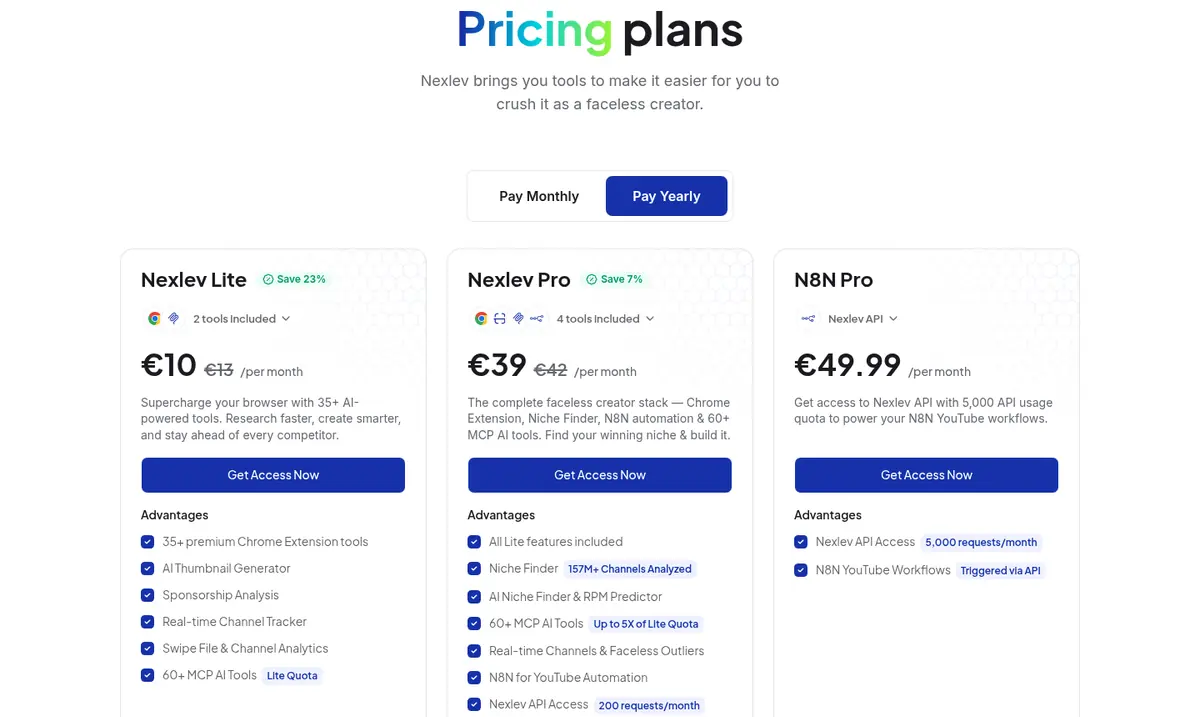
| NexLev Lite | €13/mo | €10/moSave 23% | Chrome extension (35+ tools), AI thumbnails, sponsorship analysis, 60+ MCP tools at Lite quota |
| NexLev Pro | €42/mo | €39/moSave 7% | Everything in Lite, Niche Finder, RPM predictor, MCP at up to 5x quota, N8N automation, API (200 requests/month) |
| NexLev N8N Pro | €49.99/mo | Not offered | NexLev API with 5,000 requests a month for N8N YouTube workflows |
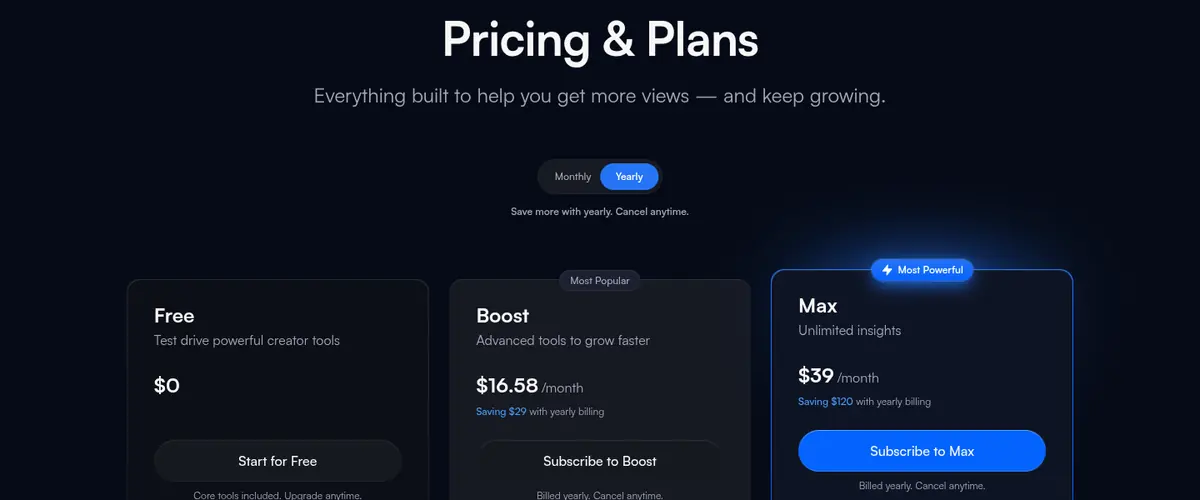
| vidIQ Free | Free | Free | 150 AI credits a month, niche trends, content ideas, AI Coach tips |
| vidIQ Boost | $19/mo | $16.58/moSave $29 with yearly billing | 2,000 AI credits, thumbnails, keyword ideas, optimization, unlimited trends and subscriber insights |
| vidIQ Max | $49/mo | $39/moSave $120 with yearly billing | 6,000 AI credits, up to 3x AI Coach conversations, Max Mode AI, up to 11 hours of short clipping |
The core differences
- Before the channel, or after it. NexLev is built to find a niche: a Niche Finder over 157M+ channels analyzed, an AI Niche Finder, an RPM predictor and faceless outliers. vidIQ is built to grow a channel you already run, with keyword ideas, optimization, trends and subscriber insights.
- A bundle, or credits. NexLev sells a toolkit: Lite at €13/mo, or €10/mo billed yearly is the Chrome extension with 35+ tools and MCP, and Pro at €42/mo, or €39/mo billed yearly adds the Niche Finder, N8N automation and API access. vidIQ meters its AI with credits: 150 a month on Free, 2,000 on Boost at $19/mo, or $16.58/mo billed yearly and 6,000 on Max at $49/mo, or $39/mo billed yearly.
- How you can try it. vidIQ has a free plan with no time limit, including MCP access. NexLev offers free tools and, on its extension page, a 5-day free trial of Lite; the Niche Finder needs Pro. It also offers a full refund within 14 days.
- Automation and AI. Both connect to AI assistants through MCP. NexLev goes further into automation with an API and N8N workflows; vidIQ goes further into guidance with the AI Coach, Max Mode and optional 1-on-1 coaching.
- Currency. NexLev bills in euros even in the US, and shows local prices in some other countries. vidIQ lists prices in US dollars.
Which one to choose
Choose NexLev if
- You are picking a faceless niche
- You want RPM estimates per channel
- You automate with N8N or an API
- You want sponsorship analysis
Choose vidIQ if
- Your channel is already running
- You want keyword ideas and SEO
- You want to start on a free plan
- You want an AI coach
When to use both
The two cover different stages, so they work one after the other: NexLev Pro to find and check a faceless niche, then vidIQ to grow the channel once it is running. If you only pay for one, vidIQ's free plan keeps its trends, ideas and MCP access available next to NexLev.
Frequently asked questions
Is NexLev or vidIQ better?
Which is cheaper, NexLev or vidIQ?
Do both work with Claude or ChatGPT?
Does vidIQ help you find a niche?
Does NexLev have a free plan?
Can I use NexLev and vidIQ together?
How we compared
NexLev and vidIQ are described only from their own public pricing and feature pages. Everything was checked on September 29, 2026. We did not use paid accounts for this page, nobody paid to be covered and none of the links are affiliate links.
Prices were read from each pricing page as seen from the US, in both billing periods where the page offers both. A feature marked "Not listed" is one we could not find on the tool's own pages, which is not the same as the tool not having it. Read our editorial standards for how we check and correct these pages.
Related reading
Judge a niche before you copy it
Start free with limited channel previews and 3 channel reports per day. No credit card required.