NexLev is a strong toolkit for faceless creators, but its Niche Finder only comes in the Pro bundle and its prices change by region. Here are 8 alternatives, compared on what each is best for, verified prices and trade-offs.
The Kavinto teamUpdated September 29, 2026 · 14 min read
We make Kavinto, one of the tools below. Every other tool is described only from its own public pages, checked on September 29, 2026. How we built this list
Trends and public stats: Viewstats or Social Blade
At a glance
The eight alternatives next to NexLev, on the four things that usually decide a switch. Each tool gets its own entry further down, with a dated screenshot of its pricing page.
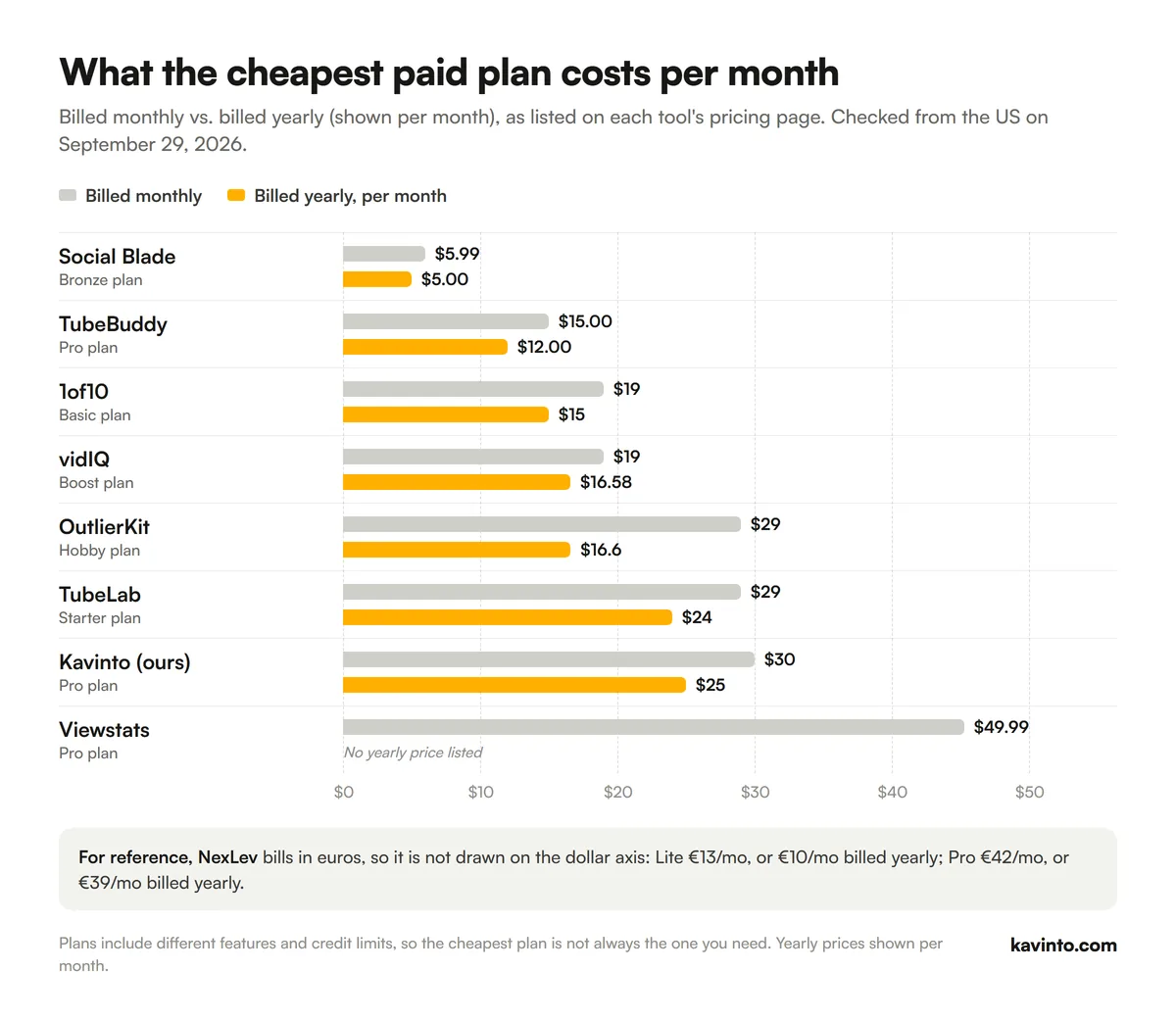
Cheapest paid plan as listed on each tool's pricing page on September 29, 2026, viewed from the US. "/yr" means billed annually. *NexLev bills in euros; its cheapest plan, Lite, does not include the Niche Finder, which needs Pro at €42/mo, or €39/mo billed yearly.
Cheapest paid plan of each alternative per month, billed monthly vs. billed yearly. Data from each pricing page on September 29, 2026.
What NexLev does well
Before looking at alternatives, it is worth being clear about what NexLev is good at. It is sold as Lite, a Chrome extension with MCP access, and Pro, which adds the Niche Finder and API access. NexLev says 500,000+ creators in 41 countries use it.
A very large index. Its Niche Finder lists 157M+ channels analyzed, with 21 advanced filters across long-form and Shorts.
Revenue signals. An AI Niche Finder and RPM Predictor sit next to real-time channel tracking and outlier channels.
A browser toolkit. The Chrome extension adds 35+ tools, including similar channels, channel analytics, a swipe file and a title and thumbnail tester.
AI and automation. An MCP server with 60+ tools for Claude and ChatGPT, plus API access for N8N workflows.
If you use all of that, NexLev Pro is hard to replace with a single tool.
Why people look for a NexLev alternative
These are the trade-offs that come straight from NexLev's own pages:
The Niche Finder only comes in the Pro bundle. NexLev's FAQ says the Niche Finder always comes with the Chrome extension, so you pay for the whole package even if you only want niche research.
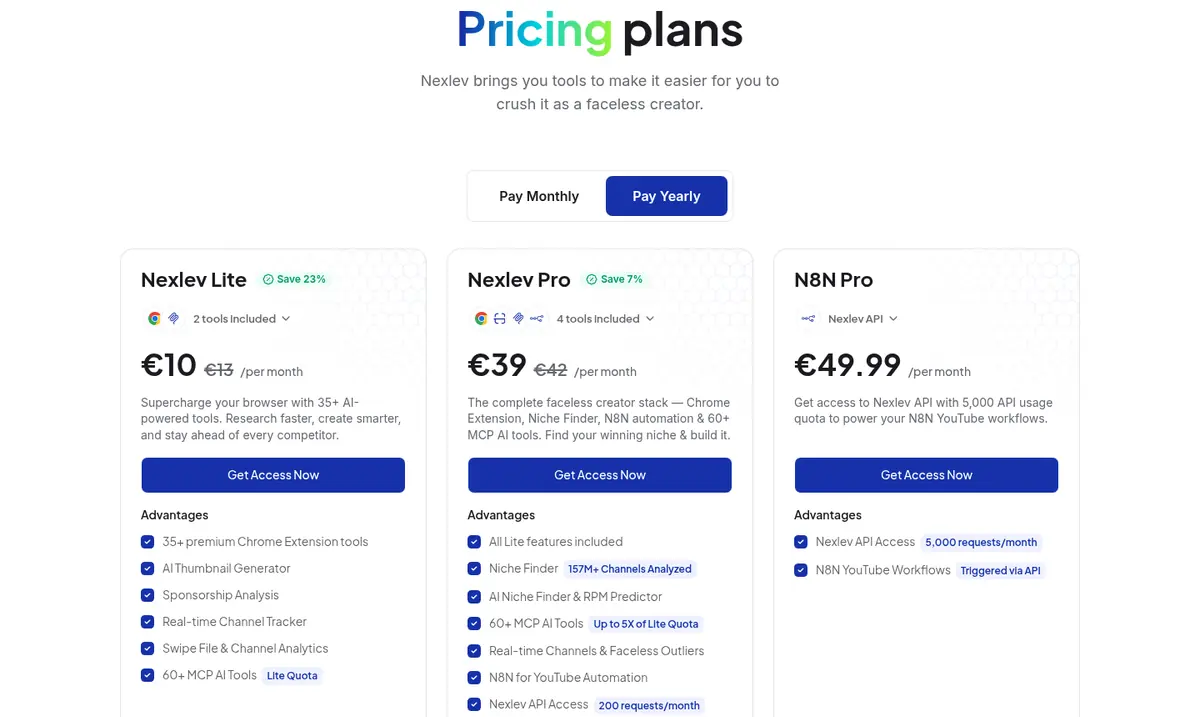
Prices change by region. Viewed from the US, NexLev lists Pro at €42/mo, or €39/mo billed yearly, in euros, the same as in Europe. Viewed from Vietnam, it shows local prices instead (Pro ₫397,000/month billed monthly, ₫318,331/month billed yearly), so there is no single USD price to compare against. Kavinto also shows local prices in some countries, so compare the prices you are shown.
The extension is built for Chrome. NexLev says it is optimized for Google Chrome and that Brave and Firefox support is still in the works.
Some numbers are estimates. NexLev notes that some of its data is estimated because of YouTube API limits. That is true of every tool here, including ours, but it matters if RPM is why you are buying.
NexLev pricing page, viewed from the US on September 29, 2026 (yearly billing view).
The 8 best NexLev alternatives
Ranked by how well each one covers the job NexLev's Niche Finder is bought for: finding a niche and judging the channels in it. Tools lower on the list are strong at a different job.
1
1. KavintoOur tool
Best for judging each channel before you copy it
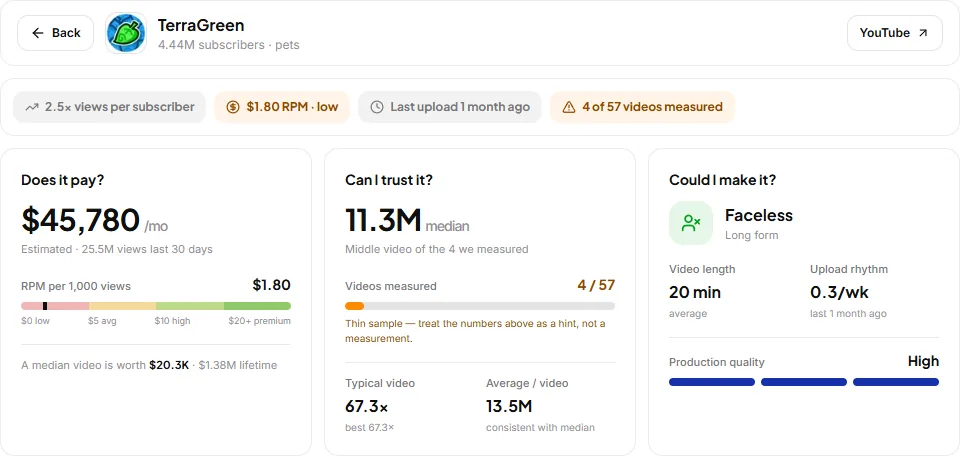
Kavinto is a research workspace for choosing a niche. You search a topic, see the channels building in it, filter to faceless, small or Shorts channels, and open a report on any of them. The report answers three questions: does it pay, can you trust the numbers, could you make it.
It tracks 50,000+ long-form and 20,000+ Shorts channels, far fewer than NexLev, and it has no browser extension or API. What it adds is a consistent verdict on every channel, with median views instead of one viral hit, so you can compare niches on the same terms. Learn more on the YouTube niche finder page.
A Kavinto channel report: does it pay, can you trust it, could you make it.
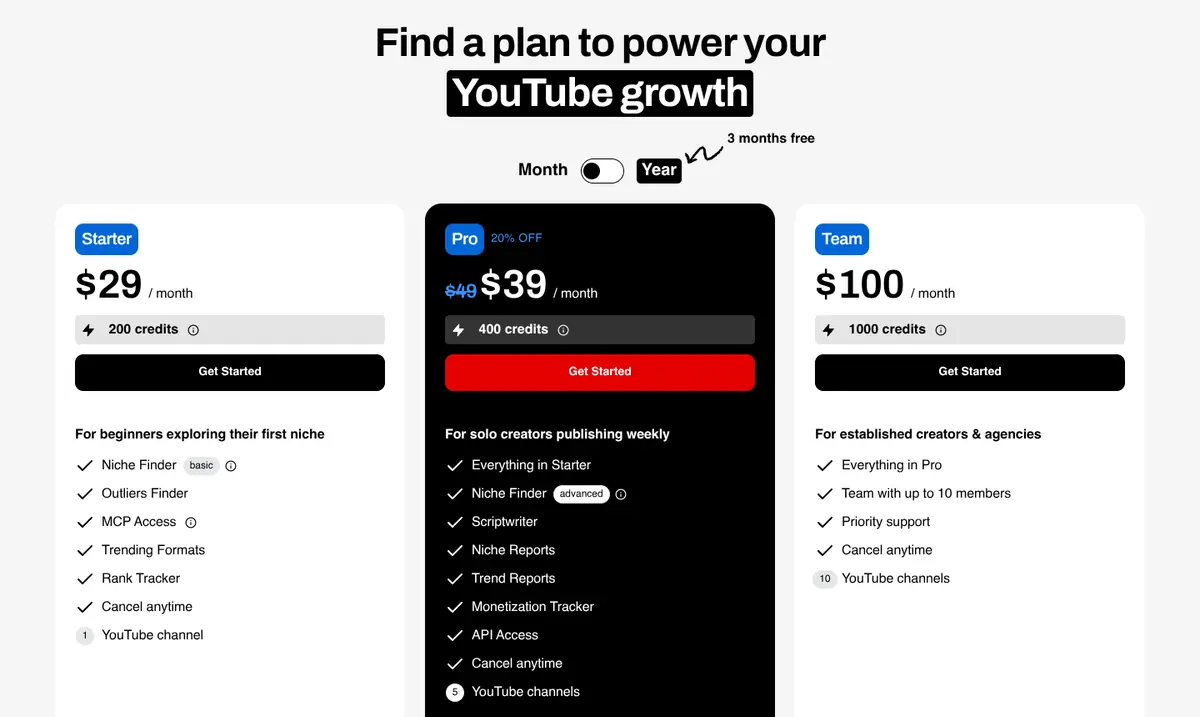
TubeLab is built around outliers. Its Niche Finder lists 500K+ breakout channels you can filter by RPM, revenue and performance, and its Outliers Finder covers 5M+ videos. It adds a Niche Analyzer for saturation and market size, trending formats, AI ideation and a scriptwriter on credits, and a YouTube Data MCP for Claude and ChatGPT.
If what you like about NexLev is filtering channels by money, TubeLab is the most direct replacement, but the revenue, RPM and audience filters start on Pro: Starter only has the basic filters. Yearly billing brings Pro to $29 a month ($348 a year). Each plan includes AI credits: 200 a month on Starter, 400 on Pro and 1,000 on Team.
TubeLab pricing page, viewed from the US on September 29, 2026 (monthly billing view).
Best for
Niche research with RPM filters
vs NexLev
Same angle, prices published in USD
Pricing
Starter $29/mo, or $24/mo billed yearly. Pro $39/mo, or $29/mo billed yearly. Team $100/mo, or $80/mo billed yearly.
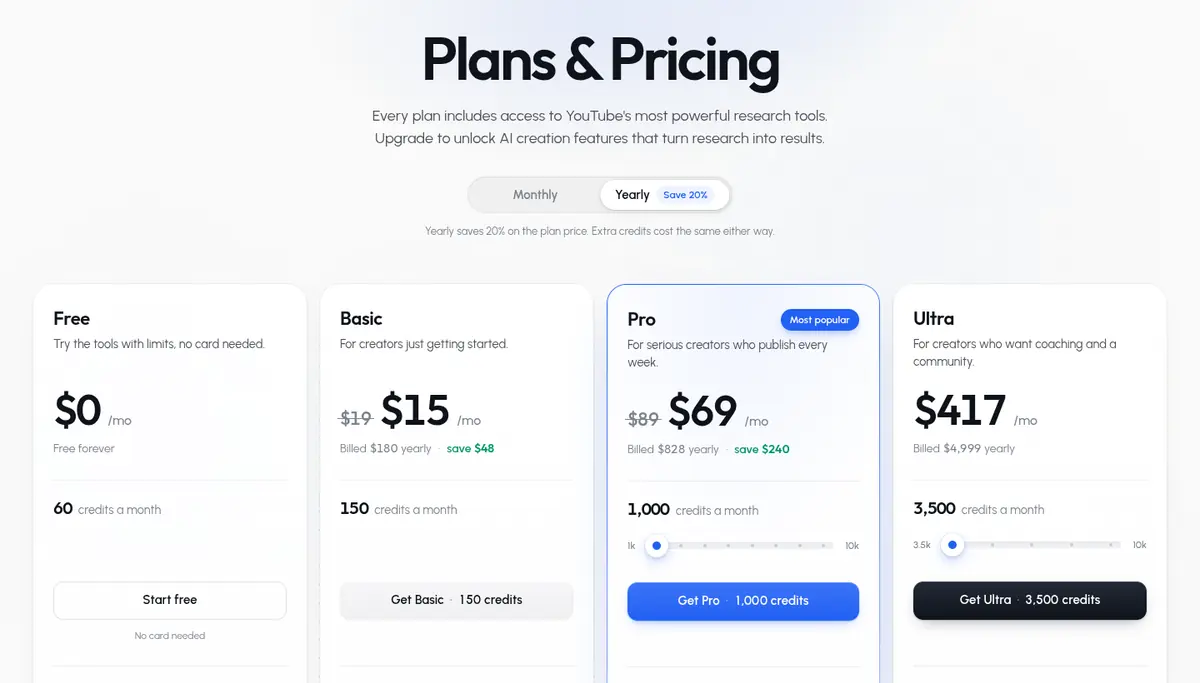
1of10 tracks outlier videos, the ones that beat their channel's average by 10x to 100x in its own words, and pairs outlier and thumbnail search with a Niche Explorer. Paid plans add AI tools for thumbnails, titles, ideas and video editing, all drawing on one pool of credits. 1of10 says 100,000+ creators use it.
Choose it over NexLev if you care more about which videos to make than about what a channel earns. The free plan gives 60 credits a month, yearly billing saves 20%, and paid plans come with a 7-day money-back guarantee.
1of10 pricing page, viewed from the US on September 29, 2026 (yearly billing view).
Best for
Video ideas from outliers
vs NexLev
Less channel economics, more ideas
Pricing
Basic $19/mo, or $15/mo billed yearly. Pro $89/mo, or $69/mo billed yearly. Ultra $4,999/yr.
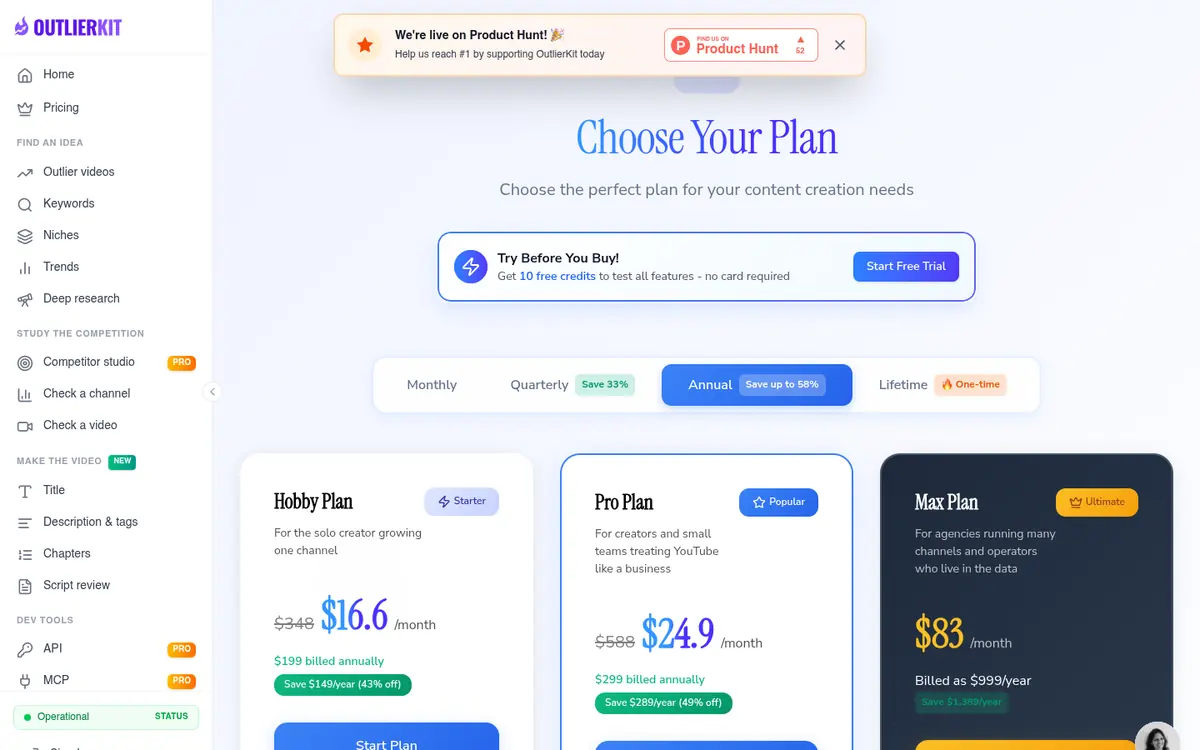
OutlierKit scores videos against their own channel's baseline and adds keyword research, single-channel competitor analysis, Deep Research and a Competitor Studio that maps a niche from one channel. Pro and Max add an MCP server and API access.
It fits once you already have a direction and want to study the channels around it. Every action has a fixed credit cost: 2 for outlier or keyword research and 50 for a Competitor Studio run. Besides monthly and annual billing it is sold quarterly and as lifetime deals.
OutlierKit pricing page, viewed from the US on September 29, 2026 (annual billing view).
Best for
Competitor and outlier research
vs NexLev
Starts from a channel, not a database
Pricing
Hobby $29/mo, or $16.6/mo billed yearly. Pro $49/mo, or $24.9/mo billed yearly. Max $199/mo, or $83/mo billed yearly.
vidIQ is a growth suite for the channel you already have: keyword and trend research, optimization suggestions, thumbnail tools and an AI coach, with a browser extension, a mobile app and optional 1-on-1 coaching.
It is a good partner to a niche research tool rather than a replacement for NexLev's Niche Finder: pick the niche first, then use vidIQ to optimize the videos.
vidIQ pricing page, viewed from the US on September 29, 2026 (yearly billing view).
Best for
Keywords and optimization
vs NexLev
Grows a channel, not built to pick one
Pricing
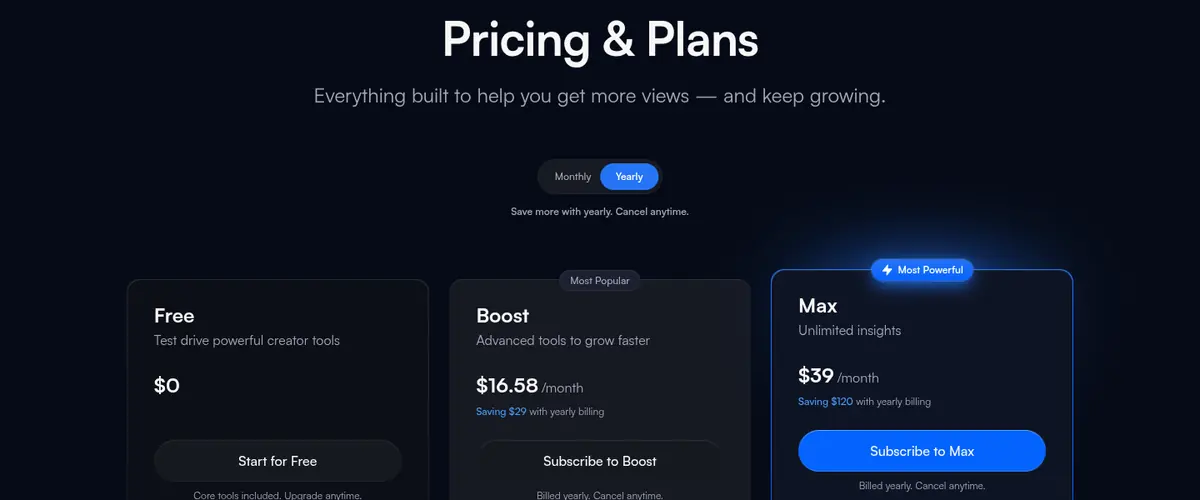
Boost $19/mo, or $16.58/mo billed yearly. Max $49/mo, or $39/mo billed yearly.
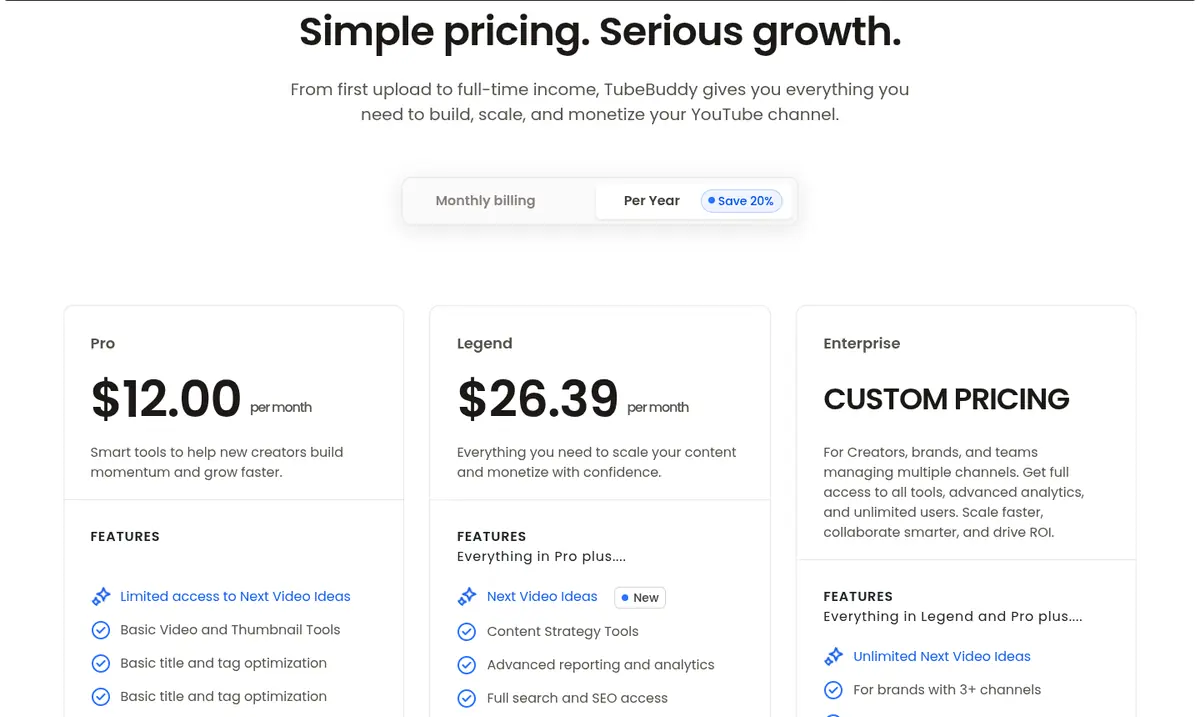
TubeBuddy is a YouTube optimization toolkit with keyword research, an SEO Studio, content strategy, video and thumbnail tools, and productivity features for uploads. TubeBuddy says millions of creators use it.
Like vidIQ, it helps once your channel is running. Creator licenses cover one channel, and TubeBuddy steers larger channels and businesses to Enterprise. Its pricing page FAQ describes a 30-day refund policy.
TubeBuddy pricing page, viewed from the US on September 29, 2026 (yearly billing view).
Best for
Keywords and upload workflow
vs NexLev
Optimizes a channel, no niche database
Pricing
Pro $15.00/mo, or $12.00/mo billed yearly. Legend $32.99/mo, or $26.39/mo billed yearly.
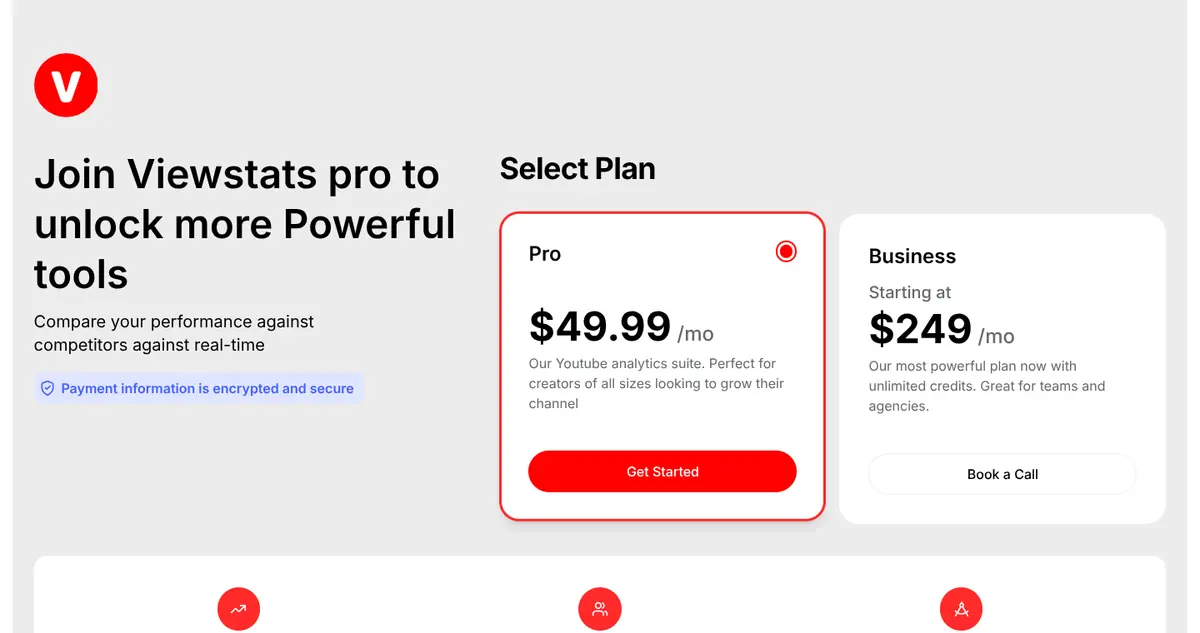
Viewstats comes from the team behind MrBeast's analytics. It tracks trends, analyzes competitors, finds outlier videos and shows which thumbnails are popular in a niche, using real-time YouTube data.
It is strongest when you want to understand why videos in a niche take off. Business adds unlimited credits and is aimed at teams and agencies.
Viewstats pricing page, viewed from the US on September 29, 2026 (default view).
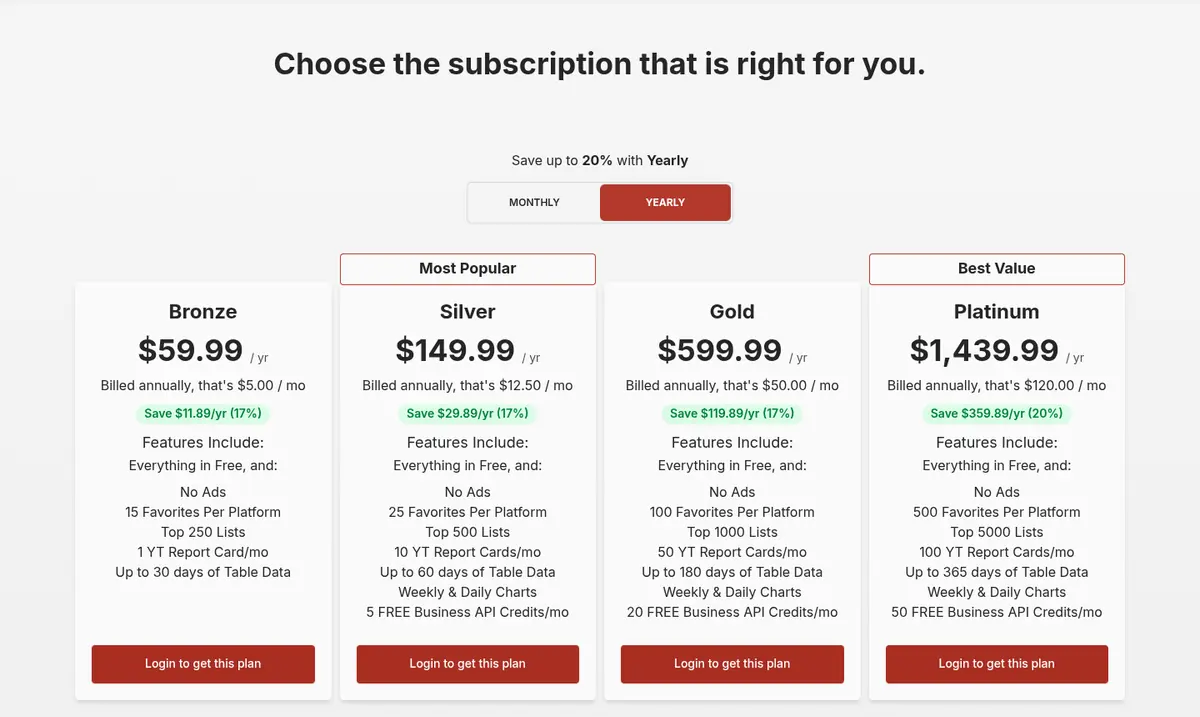
Social Blade has tracked public channel stats since 2008, across YouTube, TikTok, Twitch, Facebook and Instagram: subscriber and view history, future projections, top lists, similar channels and a money calculator.
It is the fastest way to check a channel's numbers for free. Paid plans remove ads and unlock longer table history, up to 365 days on Platinum.
Social Blade pricing page, viewed from the US on September 29, 2026 (yearly billing view).
Best for
Quick public numbers
vs NexLev
Stats on any channel, no niche research
Pricing
Bronze $5.99/mo, or $59.99/yr, up to Platinum $149.99/mo, or $1,439.99/yr.
Whichever tool you pick, these are the questions worth asking before you pay:
Does it cover the channels you care about? Long-form and Shorts, faceless and on-camera, and the languages you plan to make videos in.
Does it judge channels, or only list them? Median views and how many videos a number is based on tell you more than one viral hit.
Does it label estimates honestly? Revenue and RPM are always estimates. A good tool says so and shows a range.
Can you filter to what you could make? Faceless, video length and upload rhythm matter more than subscriber counts.
Can you try it first? A free plan or trial lets you test it on your own niche ideas before paying.
Can you read the price? Published prices in both billing periods and clear credit costs make it easy to compare the real cost.
How to choose a NexLev alternative
Do you want the same job NexLev's Niche Finder does?
Start with Kavinto if you want to judge channels for free, or TubeLab if you want the largest breakout-channel index with RPM filters.
Do you care more about video ideas than channel economics?
Try 1of10 for outlier ideas, or Viewstats for trends and thumbnails.
Do you already run a channel and need SEO?
Use vidIQ or TubeBuddy, ideally next to a niche research tool.
Are you studying specific competitors?
OutlierKit is built for starting from one channel and mapping what is around it.
Do you only need public numbers?
Social Blade is free and covers most platforms.
Which tool fits each job
Which NexLev alternative fits each job
The job
Best pick
Why
Pick a niche, starting free
Kavinto
Free plan and a report on every channel
Filter channels by RPM
TubeLab
RPM and revenue filters on 500K+ channels
Find video ideas that work
1of10
Outlier and thumbnail search, free plan
Study one competitor deeply
OutlierKit
Competitor analysis and Studio
Optimize a running channel
vidIQ
Keywords, optimization, AI coach
Tune uploads for search
TubeBuddy
Keyword research and upload tools
Spot trends in a niche
Viewstats
Outliers and thumbnail trends
Check any channel's stats
Social Blade
Free public stats and history
Frequently asked questions
What is the best NexLev alternative?
It depends on why you use NexLev. For the same job, finding and judging a niche, Kavinto gives you a free plan and a report on every channel, while TubeLab gives you a larger breakout-channel index with RPM and revenue filters. For video ideas, 1of10. For SEO on a channel you already run, vidIQ or TubeBuddy.
Is there a free NexLev alternative?
Yes. Kavinto has a free plan with 3 channel reports a day and no card. 1of10, vidIQ and TubeBuddy have free plans, Viewstats has a free account, Social Blade is free for public stats, and OutlierKit has a free trial with no card.
What is the cheapest NexLev alternative?
Social Blade is free for public stats, and several tools have free plans. Among paid plans checked on September 29, 2026: Social Blade Bronze is $5.99/mo, or $59.99/yr; TubeBuddy Pro is $15.00/mo, or $12.00/mo billed yearly; 1of10 Basic is $19/mo, or $15/mo billed yearly; OutlierKit Hobby is $29/mo, or $16.6/mo billed yearly. Kavinto Pro is $30/mo, or $300/yr.
Which NexLev alternative is best for faceless channels?
For choosing a faceless niche, Kavinto lets you filter to faceless channels and check whether each one pays, holds up and could be made by you. TubeLab is the pick if you want the largest breakout-channel index with RPM and revenue filters.
Is NexLev worth it?
If you want a Chrome extension, AI assistant access through MCP and automation alongside a niche finder, the Pro bundle covers all of them. If you mainly need to pick a niche, you may not use most of the bundle, and a focused tool can cost less.
Does NexLev offer refunds?
NexLev's pricing page says you can request a full refund within 14 days of purchase. Kavinto also gives first-time subscribers a full refund within 14 days of their first payment.
Why is Kavinto on this list?
We make Kavinto, and it does the same job NexLev's Niche Finder does. We say so at the top, list its weaknesses next to its strengths, and describe every other tool only from its own public pages so you can check each claim.
How current are these prices?
Every price was checked on each tool's own pricing page on September 29, 2026, viewed from the US, in both monthly and yearly billing where the page offers both. Each tool's entry shows a dated screenshot of its pricing page. NexLev bills in euros in the US and Europe and in local currency in some other countries. Confirm on each pricing page before you buy.
How we built this list
We make Kavinto, which is one of the tools on this list. Every other tool is described only from its own public pricing and feature pages, checked on September 29, 2026. We did not use paid accounts of these tools for this page, none of them paid to be included, and none of the links are affiliate links.
Prices were read from each pricing page as seen from the US, in both monthly and yearly billing where the page offers both, and every entry shows a screenshot of that page with the date and billing view. Where a page only describes a discount in words, we quote it rather than work out a price.
Tools are ranked by how well they cover the job NexLev's Niche Finder is bought for, finding a niche and judging the channels in it. Prices and features change, so confirm on the pages below before you buy. Read our editorial standards for how we check and correct these pages.