TubeLab is one of the best tools for filtering niches and outliers by money, but it has no free plan, its revenue and RPM filters start on Pro and its refund window is short. Here are 8 alternatives, compared on the same job, verified prices and trade-offs.
The Kavinto teamUpdated September 29, 2026 · 13 min read
We make Kavinto, one of the tools below. Every other tool is described only from its own public pages, checked on September 29, 2026. How we built this list
The eight alternatives next to TubeLab, on the four things that usually decide a switch. Each tool gets its own entry further down, with a dated screenshot of its pricing page.
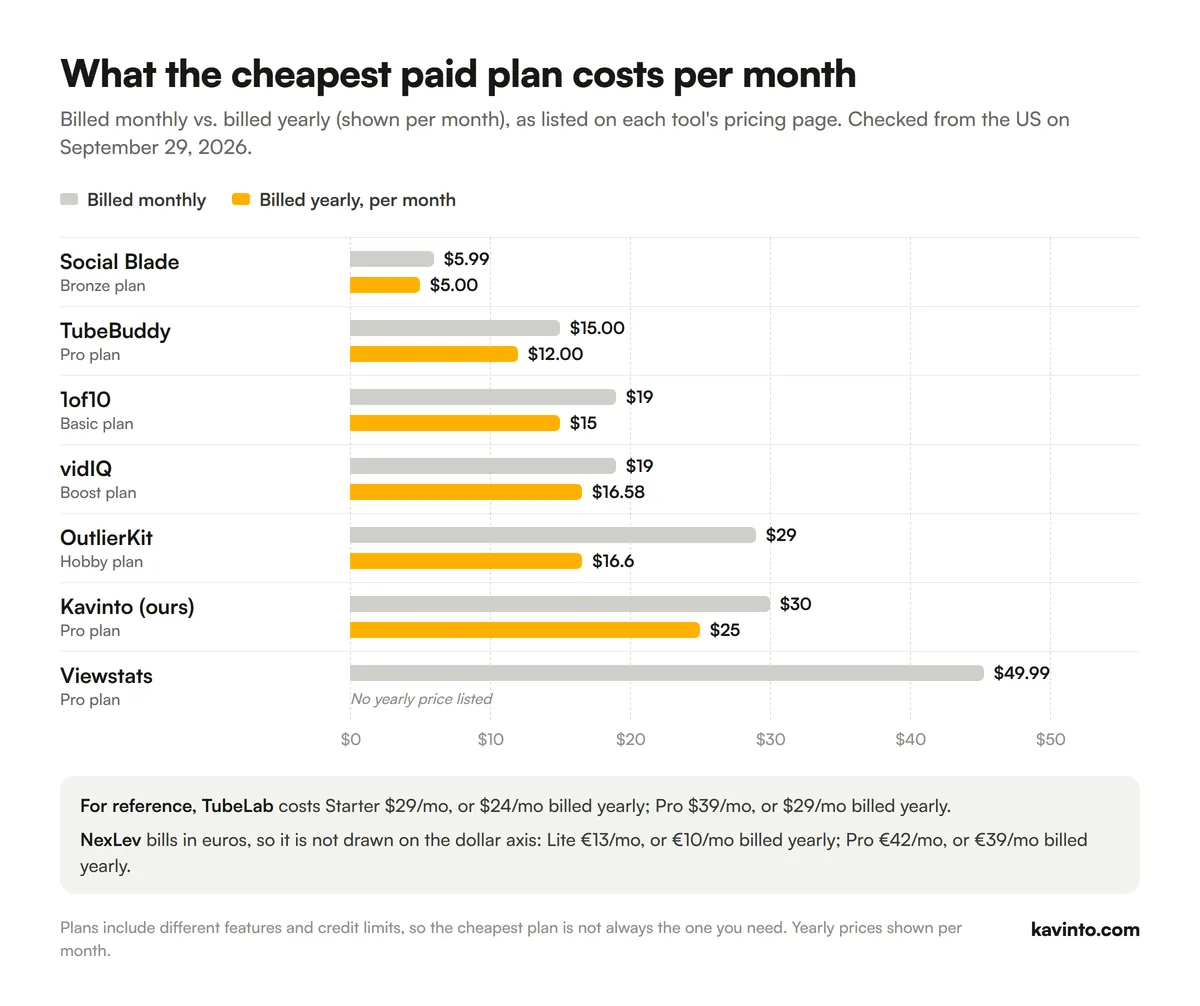
Cheapest paid plan as listed on each tool's pricing page on September 29, 2026, viewed from the US. "/yr" means billed annually. NexLev bills in euros, so its price is shown in euros.
Cheapest paid plan of each alternative per month, billed monthly vs. billed yearly. Data from each pricing page on September 29, 2026.
What TubeLab does well
TubeLab was built by Antonio Santos, a Portuguese developer and creator, around one idea: find small channels that are quietly breaking out. It does that well.
A breakout-channel index. Its Niche Finder lists 500K+ breakout channels and adds new ones every day; TubeLab says every channel is refreshed at least once a month.
Detailed filters. AI-detected faceless and on-camera, made with AI, content authenticity, consistent views and, on Pro, monetization, 30-day revenue, RPM and audience filters.
A large outlier library. An Outliers Finder over 5M+ videos that TubeLab says it picked from 400M+ public videos, with similar-video search by title, topic, thumbnail and channel.
Unlimited searching and MCP. Niche Finder and Outliers Finder searches are unlimited on every plan, and an MCP server for Claude and ChatGPT is included from Starter.
If you choose niches by RPM and revenue, TubeLab Pro is one of the most complete tools for it.
Why people look for a TubeLab alternative
These are the trade-offs that come straight from TubeLab's own pages:
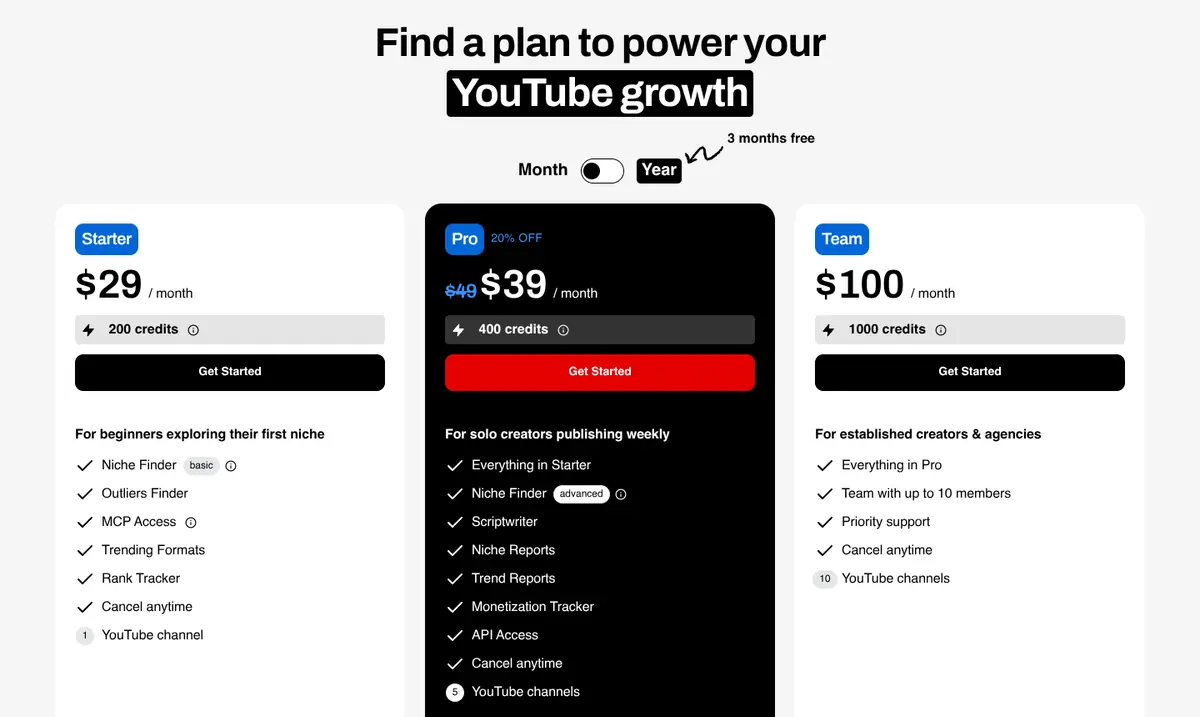
There is no free plan. The only free product is a Chrome extension that checks monetization. Every search needs a paid plan, from $29 a month.
The money filters start on Pro. Starter leaves out monetized channels, revenue, RPM, revenue sources and audience filters, so the reason most people pick TubeLab costs $39/mo, or $29/mo billed yearly.
Credits for AI, MCP and API. Searching is unlimited, but the scriptwriter, trend reports, ideation and MCP and API calls all use credits: 200 a month on Starter and 400 on Pro.
A short refund window. TubeLab gives a full refund within 24 to 48 hours and 50% within 15 days, and does not refund renewals.
TubeLab pricing page, viewed from the US on September 29, 2026 (monthly billing view).
The 8 best TubeLab alternatives
Ranked by how well each one covers the job TubeLab is bought for: finding niches and outlier videos and filtering them by what they earn. Tools lower on the list are strong at a nearby job.
1
1. NexLev
Closest swap: a bigger index with an RPM predictor
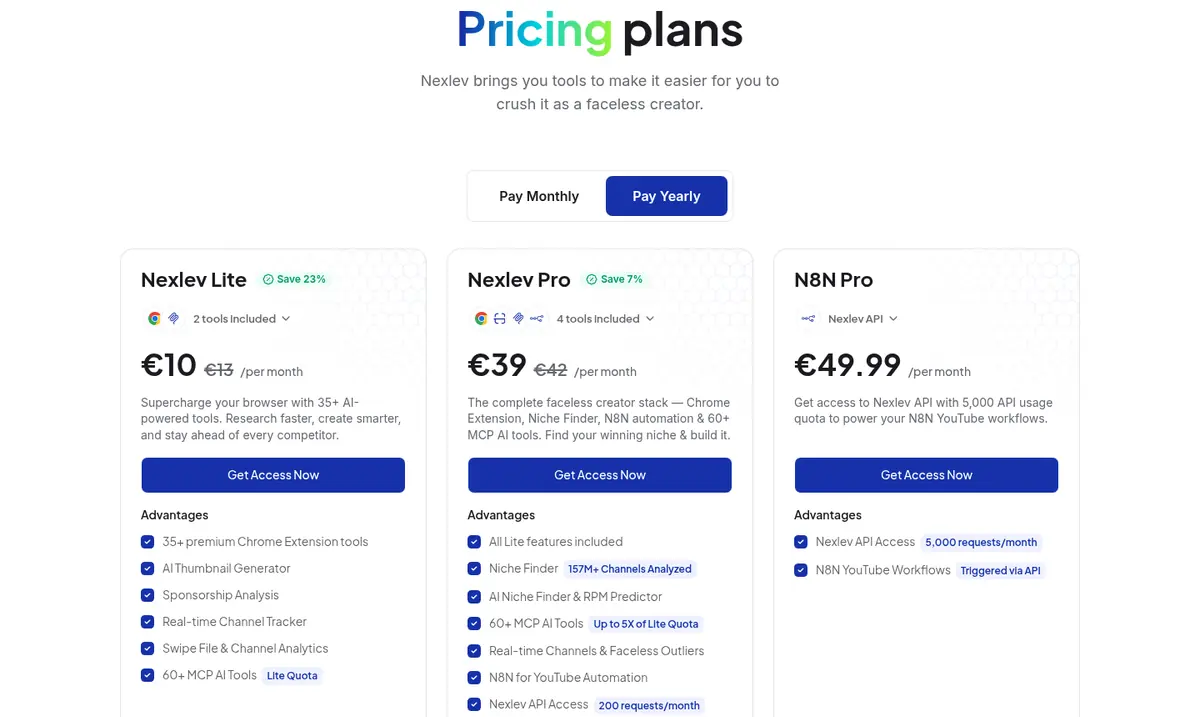
NexLev covers the same job at a larger scale: its Niche Finder lists 157M+ channels analyzed with 21 filters, an AI Niche Finder and an RPM predictor, faceless outliers and real-time channel tracking. It also bundles a Chrome extension with 35+ tools, 60+ MCP tools and N8N automation.
The Niche Finder is Pro only, at €42/mo, or €39/mo billed yearly in euros, with no trial listed for it (the extension has a 5-day free trial), but NexLev gives a full refund within 14 days, a much longer window than TubeLab's.
NexLev pricing page, viewed from the US on September 29, 2026 (yearly billing view).
Best for
Faceless niches with RPM
vs TubeLab
Bigger index, bundled with a toolkit
Pricing
Lite €13/mo, or €10/mo billed yearly. Pro €42/mo, or €39/mo billed yearly. N8N Pro €49.99/mo.
Free option
Free tools and a 5-day free trial of the extension; Niche Finder only in Pro
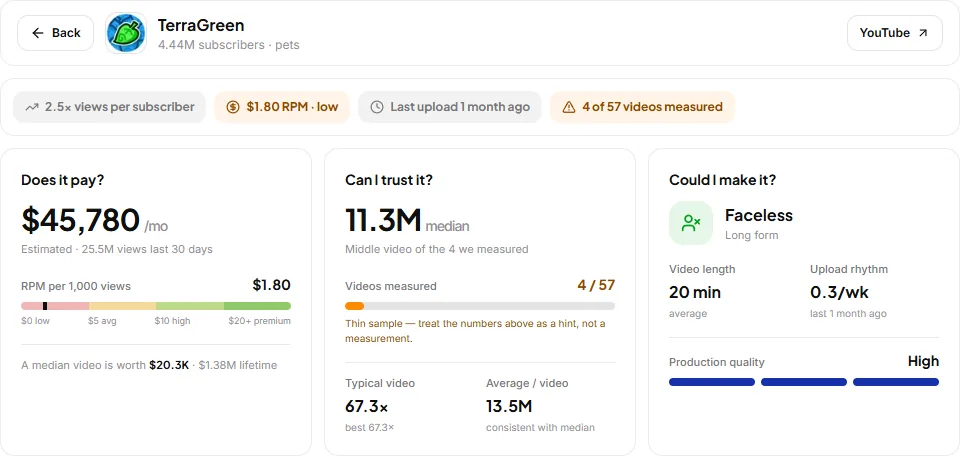
Kavinto approaches the same question from the other side: instead of the most channels, a report on each one. Search a topic, filter to faceless, small or Shorts channels, and each report shows estimated earnings and RPM, a median of the videos it measured, how many videos that is, and whether the format is one you could make.
It tracks 50,000+ long-form and 20,000+ Shorts channels, far fewer than TubeLab, and has no MCP or API. What it adds is a free plan with 3 channel reports a day, and Pro at $30/mo, or $300/yr. See our Kavinto vs TubeLab comparison.
A Kavinto channel report: does it pay, can you trust it, could you make it.
If TubeLab's Outliers Finder is what you use most, 1of10 is the free way to replace it. It searches for videos beating their channel's average, finds popular thumbnails and tracks competitors, and research never uses credits.
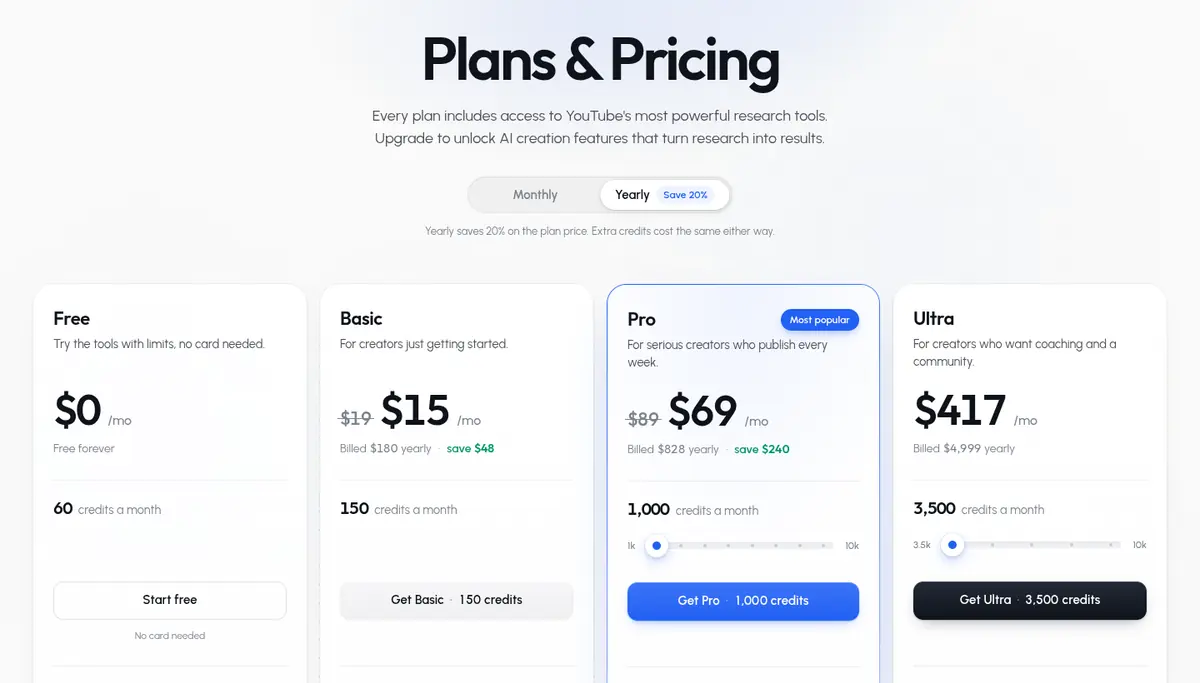
It does not filter by revenue or RPM. The free plan shows 5 results per search; Basic is $19/mo, or $15/mo billed yearly with full results and a 7-day money-back guarantee.
1of10 pricing page, viewed from the US on September 29, 2026 (yearly billing view).
Best for
Video ideas from outliers
vs TubeLab
Outliers without the money filters
Pricing
Basic $19/mo, or $15/mo billed yearly. Pro $89/mo, or $69/mo billed yearly. Ultra $4,999/yr.
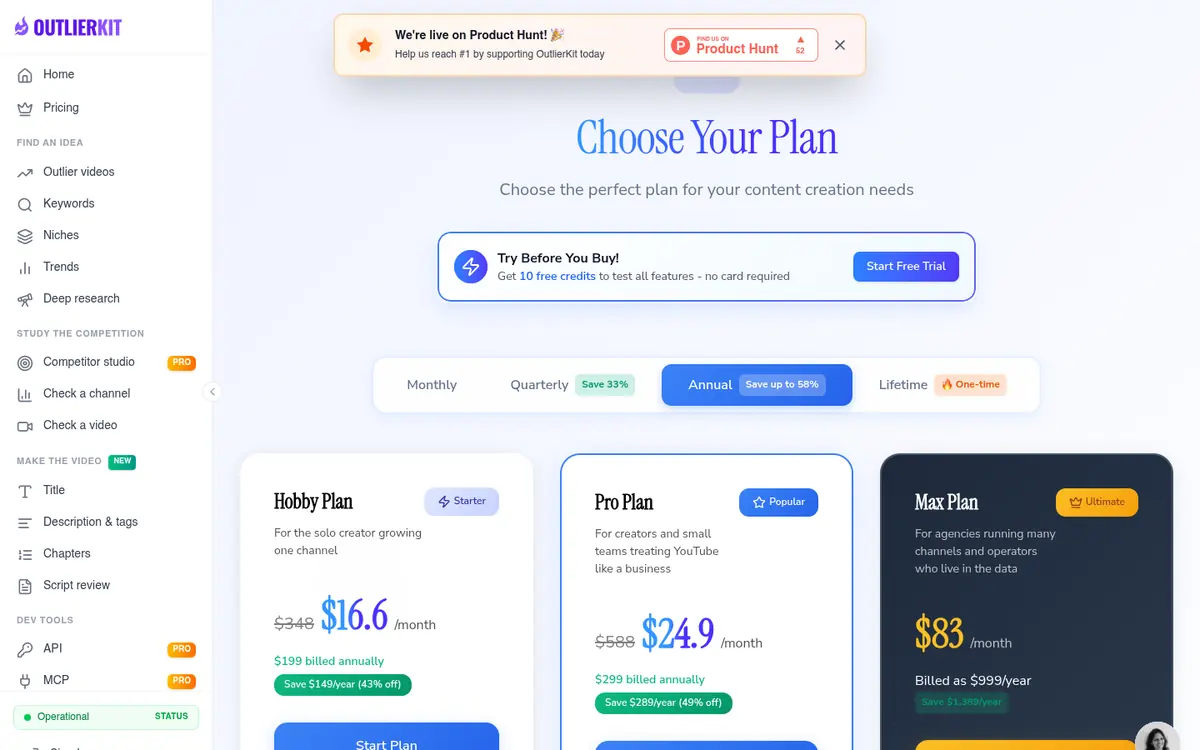
OutlierKit scores videos against their own channel's baseline and adds keyword research, competitor analysis and Deep Research. Its Competitor Studio, on Pro and Max, maps a whole niche from a single channel.
Every action has a credit cost, including research, and there is a free trial with no card. Hobby is $29/mo, or $16.6/mo billed yearly, and MCP and API access start on Pro.
OutlierKit pricing page, viewed from the US on September 29, 2026 (annual billing view).
Best for
Competitor and outlier research
vs TubeLab
Starts from a channel, not a database
Pricing
Hobby $29/mo, or $16.6/mo billed yearly. Pro $49/mo, or $24.9/mo billed yearly. Max $199/mo, or $83/mo billed yearly.
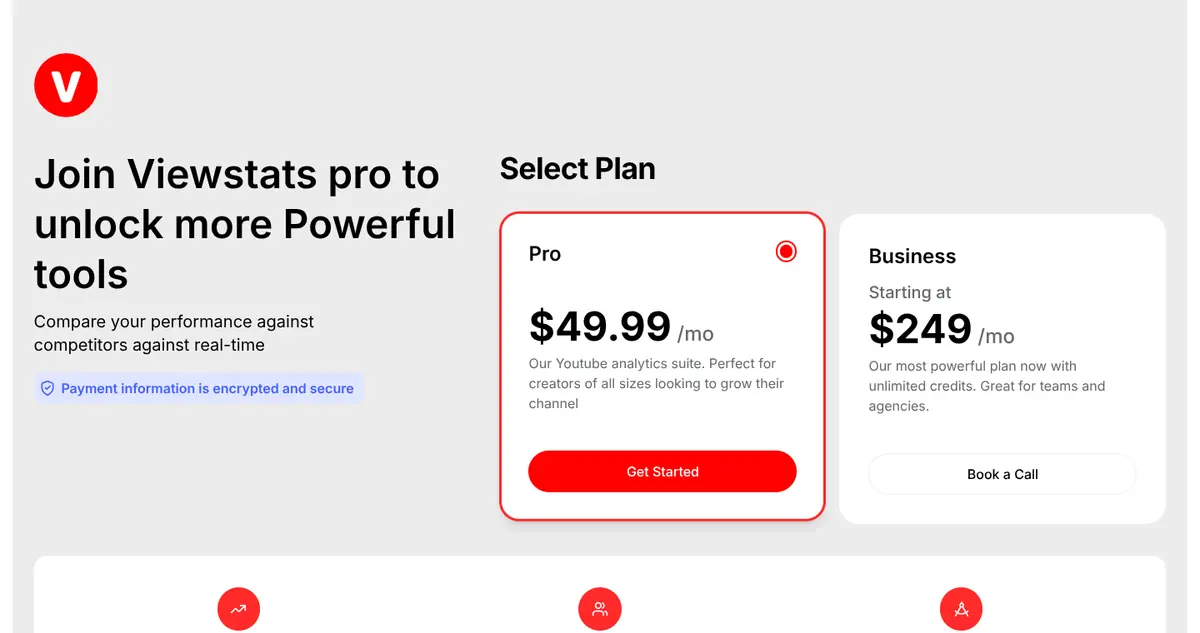
Viewstats, owned by MrBeast, tracks competitors, finds outlier videos, sends trend alerts and searches thumbnails from real-time YouTube data. It helps you understand a niche you already picked more than pick one by money.
There is a free account and free site. Pro is $49.99/mo with no yearly discount listed, more than TubeLab Pro.
Viewstats pricing page, viewed from the US on September 29, 2026 (default view).
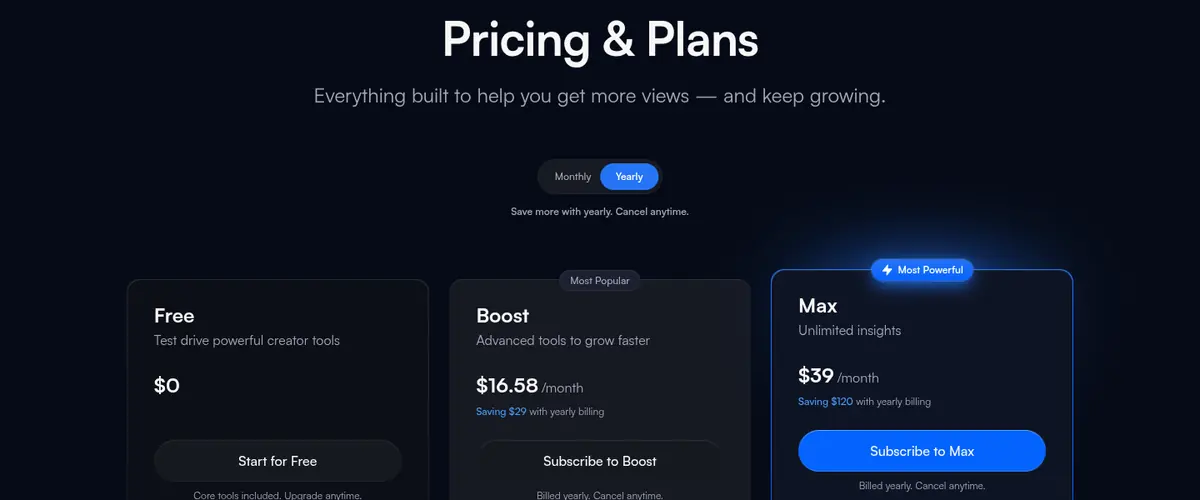
vidIQ is not a niche database, but it covers what comes after TubeLab: keyword ideas, optimization suggestions, trend research and an AI Coach, with MCP for Claude and ChatGPT on every plan.
The free plan includes 150 AI credits a month; Boost is $19/mo, or $16.58/mo billed yearly.
vidIQ pricing page, viewed from the US on September 29, 2026 (yearly billing view).
Best for
Channel growth and AI ideas
vs TubeLab
Grows a channel, does not filter niches
Pricing
Boost $19/mo, or $16.58/mo billed yearly. Max $49/mo, or $39/mo billed yearly.
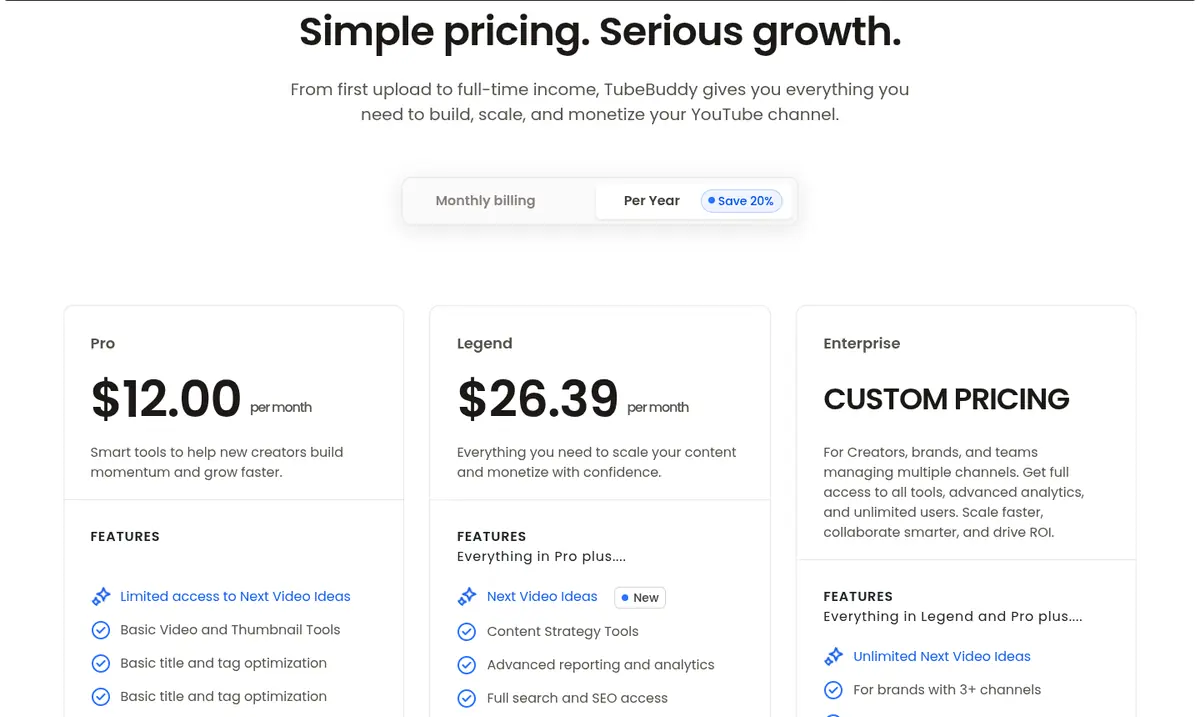
TubeBuddy works inside YouTube Studio: keyword research, SEO Studio, channel analytics and upload templates, and on Legend A/B testing, scheduled publishing and bulk edits.
It is a partner to a research tool rather than a replacement for TubeLab. Pro is $15.00/mo, or $12.00/mo billed yearly, and there is a free plan.
TubeBuddy pricing page, viewed from the US on September 29, 2026 (yearly billing view).
Best for
Keywords and upload workflow
vs TubeLab
Optimizes uploads, no niche database
Pricing
Pro $15.00/mo, or $12.00/mo billed yearly. Legend $32.99/mo, or $26.39/mo billed yearly.
Whichever tool you pick, these are the questions worth asking before you pay:
Which filters do you need, and on which plan? Revenue, RPM and audience filters are often held back for higher plans.
How big, and how fresh, is the index? More channels help discovery; how often each one is refreshed matters for judging it.
Does it show how solid a number is? A median over many videos says more than one viral hit.
What uses credits? Some tools charge for searches, others only for AI, MCP or API calls.
Can you try it first? A free plan, a trial or a long refund window lets you test it on your own niche ideas.
Can you use it with your AI assistant? MCP access varies from every plan to top plans only.
How to choose a TubeLab alternative
Do you want the same job at a larger scale?
NexLev Pro has the bigger index and an RPM predictor, with a 14-day refund window.
Do you want to judge channels before paying anything?
Kavinto's free plan gives you 3 channel reports a day, each with earnings, RPM and a measured median.
Is it the outlier videos you use most?
1of10 has a free plan, and its research never uses credits.
Do you start from a competitor channel?
OutlierKit maps a niche from one channel; Viewstats tracks competitors over time.
Have you already picked your niche?
vidIQ or TubeBuddy will help you grow the channel.
Which tool fits each job
Which TubeLab alternative fits each job
The job
Best pick
Why
Search the largest channel index
NexLev
157M+ channels analyzed, RPM predictor
Check whether a channel is worth copying
Kavinto
Earnings, RPM and a measured median per channel
Find outlier ideas for free
1of10
Outlier search that never uses credits
Map a niche around one channel
OutlierKit
Competitor Studio and keyword research
Watch what works in your niche
Viewstats
Competitors, Outliers, Alerts, Thumbnail Search
Optimize a running channel
vidIQ
Keyword ideas, AI Coach, MCP on every plan
Check a channel's public growth
Social Blade
Free stats, history and projections
Tune titles, tags and uploads
TubeBuddy
SEO Studio and upload tools
Frequently asked questions
What is the best TubeLab alternative?
For the same job, filtering niches and outliers by money, NexLev, which has a larger index and an RPM predictor on Pro. For judging each channel with a free plan, Kavinto. For outlier ideas on a free plan, 1of10.
Is there a free TubeLab alternative?
Yes. Kavinto has a free plan with 3 channel reports a day, 1of10 a free plan for outlier research, vidIQ a free plan, Viewstats a free account and Social Blade free public stats. TubeLab itself has no free plan.
Is TubeLab better than NexLev?
TubeLab is cheaper to start, lists its prices in dollars, and includes MCP on every plan. NexLev has the larger index, a Chrome extension toolkit and a longer 14-day refund window, but its Niche Finder needs Pro in euros.
Does TubeLab have RPM filters on every plan?
No. Monetization, revenue, RPM and audience filters are on Pro and Team. Starter includes the basic channel and content filters, such as faceless, Shorts and consistent views.
What is TubeLab's refund policy?
A full refund within 24 to 48 hours and 50% within 15 days, through its support page. Recurring subscription payments are not refunded.
Why is Kavinto on this list?
We make Kavinto, and it does a similar job to TubeLab's Niche Finder with a much smaller index. We rank it second, after NexLev, and list its smaller index and missing MCP and API as weaknesses.
How current are these prices?
Every price was checked on each tool's own pricing page on September 29, 2026, in both monthly and yearly billing where the page offers both. Each entry shows a dated screenshot of the pricing page.
How we built this list
We make Kavinto, which is one of the tools on this list. Every other tool is described only from its own public pricing and feature pages, checked on September 29, 2026. We did not use paid accounts of these tools for this page, none of them paid to be included, and none of the links are affiliate links.
Prices were read from each pricing page as seen from the US, in both monthly and yearly billing where the page offers both, and every entry shows a screenshot of that page with the date and billing view. Where a page only describes a discount in words, we quote it rather than work out a price.
Tools are ranked by how well they cover the job TubeLab is bought for, finding niches and outlier videos and filtering them by what they earn. Prices and features change, so confirm on the pages below before you buy. Read our editorial standards for how we check and correct these pages.