

ComparisonVerified September 2026
Kavinto vs TubeLab: Which Niche Finder Fits You in 2026?
Kavinto and TubeLab both help you find a niche worth starting. TubeLab gives you a larger breakout-channel index with RPM filters, outliers, MCP and AI scripts; Kavinto gives you a free plan and a report on every channel. Here is which one wins each job.

We make Kavinto. TubeLab is described only from its own public pages, checked on September 29, 2026, and we list where Kavinto falls short. How we compared
On this page
The short answer
- Start for free: Kavinto
- Bigger channel index: TubeLab
- Judging one channel: Kavinto
- Outlier video library: TubeLab
- AI scripts, MCP and API: TubeLab
- Longer refund window: Kavinto
Who wins each job
Kavinto and TubeLab overlap, but they are built for different jobs. Here is the better pick for each one:
| The job | Better pick | Why |
|---|---|---|
| Try niche research for free | Kavinto | Free plan with 3 channel reports a day; TubeLab has no free plan |
| Search the most breakout channels | TubeLab | 500K+ breakout channels, against Kavinto's 70,000+ |
| Filter channels by RPM and revenue | TubeLab | Revenue, RPM and audience filters on Pro |
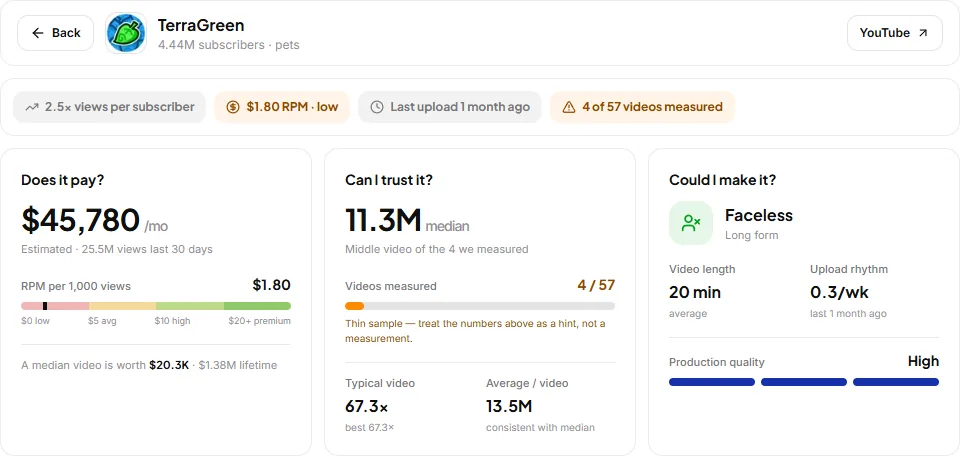
| Judge whether one channel is worth copying | Kavinto | Each report: does it pay, can you trust it, could you make it |
| Know how solid a channel's numbers are | Kavinto | Reports show how many videos were measured and flag thin samples |
| Find outlier videos to model | TubeLab | Outliers Finder over 5M+ videos, similar-video search |
| Use research in Claude or ChatGPT | TubeLab | MCP on every plan; Kavinto has no MCP |
| Faceless and Shorts channels | Both | Both filter to faceless and Shorts channels |
Features side by side
| Feature | Kavinto | TubeLab |
|---|---|---|
| Niche finder | Long-form and Shorts | Basic on Starter, all filters on Pro |
| Outlier videos | Yes | Yes |
| Similar channels | Yes | Yes |
| Revenue / RPM estimates | RPM and earnings in each report | RPM and revenue filters on Pro |
| Keyword research | No | Rank Tracker only |
| Channel reports | Yes | Niche Analyzer |
| Browser extension | No | Free checker |
| MCP for AI assistants | No | Every plan, uses credits |
| API | No | Pro and Team |
| Free plan or trial | Free plan | Free extension |
| Channel index | 50,000+ long-form, 20,000+ Shorts | 500K+ breakout channels |
| Per-channel report | Pay, trust, make: every channel | Niche Analyzer, niche reports on Pro |
| Sample size shown | Yes, videos measured | Not listed |
| Faceless filter | Yes | Yes, AI-detected |
| AI scriptwriter | No | Pro and Team |
| Rank tracker | No | 50 to 500 keywords |
| Team seats | Not listed | Up to 10 on Team |
| Refund policy | Full refund within 14 days | Full in 24-48 hours, 50% in 15 days |
Pricing side by side
| Plan | Billed monthly | Billed yearly | Includes |
|---|---|---|---|
| Kavinto Free | Free | Free | Limited channel previews, 3 channel reports a day, no card |
| Kavinto Pro | $30/mo | $300/yr | Unlimited channel reports |
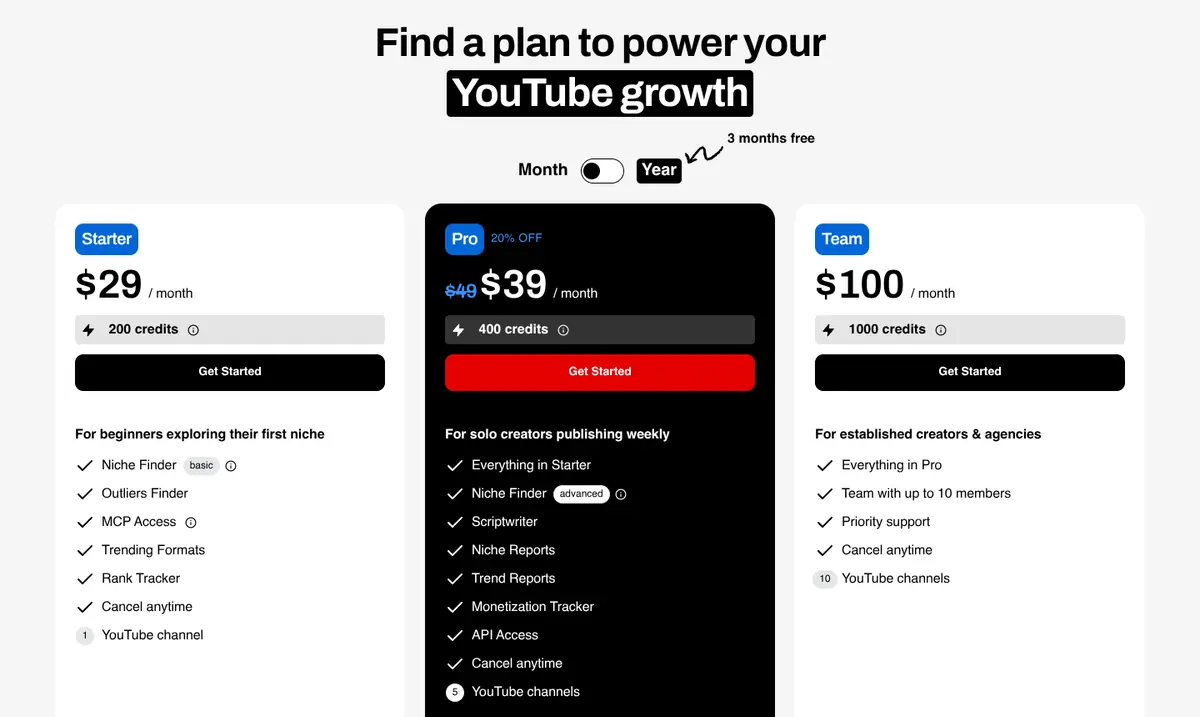
| TubeLab Starter | $29/mo | $24/mo$288 a year | 200 credits a month, 1 channel, basic Niche and Outliers filters (no revenue, RPM or audience filters), MCP |
| TubeLab Pro | $39/moListed down from $49 | $29/mo$348 a year | 400 credits a month, 5 channels, all filters incl. revenue, RPM and audience, niche and trend reports, API |
| TubeLab Team | $100/mo | $80/mo$960 a year | 1,000 credits a month, 10 channels, up to 10 members, 1-on-1 onboarding |
The core differences
- How many channels, and how much judgment. TubeLab lists 500K+ breakout channels and adds new ones daily, with detailed filters. Kavinto tracks 50,000+ long-form and 20,000+ Shorts channels, far fewer, and puts the work into a report on each one: estimated earnings and RPM, a median of the videos it measured and how many that is, and whether the format is one you could make.
- Where the money data is. TubeLab's revenue, RPM and audience filters are on Pro, at $39/mo, or $29/mo billed yearly; Starter, at $29/mo, or $24/mo billed yearly, has the basic filters only. Kavinto shows estimated earnings and RPM in every report, including on the free plan's 3 reports a day.
- What else you get. TubeLab adds an Outliers Finder over 5M+ videos, trending formats, a rank tracker, AI ideation, a scriptwriter and an MCP server. Kavinto has outlier videos and similar channels, but no scriptwriter, rank tracker, MCP or API.
- How you can try it. Kavinto has a free plan with no card. TubeLab has no free plan, only a free monetization-checker extension, and refunds in full only within 24 to 48 hours, 50% within 15 days. Kavinto refunds first-time subscribers in full within 14 days of their first payment.
- Price. Kavinto Pro is $30/mo, or $300/yr. TubeLab Pro, the plan with the money filters, is $39/mo, or $29/mo billed yearly.
Which one to choose
Choose Kavinto if
- You want to test niches for free
- You judge channels before copying
- You want sample sizes shown
- You want a 14-day refund window
Choose TubeLab if
- You want the biggest channel index
- You filter channels by RPM
- You want outliers and AI scripts
- You want MCP or API access
When to use both
TubeLab is good at surfacing channels; Kavinto is good at judging them. If you pay for TubeLab, use Kavinto's free plan to open a report on the channels you shortlist and see whether their views hold up across the videos measured. If you start with Kavinto, TubeLab Pro is the upgrade when you want a bigger index and RPM filters.
Frequently asked questions
Is Kavinto a good TubeLab alternative?
Which is cheaper, Kavinto or TubeLab?
Which has more channels?
Do both show RPM?
Which has the better refund policy?
Does Kavinto have MCP or an API?
How we compared
We make Kavinto, so this is not a neutral page, and we have tried to make it a fair one. TubeLab is described only from its own public pricing and feature pages, and Kavinto only from facts we publish on kavinto.com. Everything was checked on September 29, 2026. We did not use paid accounts for this page, nobody paid to be covered and none of the links are affiliate links.
Prices were read from each pricing page as seen from the US, in both billing periods where the page offers both. A feature marked "Not listed" is one we could not find on the tool's own pages, which is not the same as the tool not having it. Read our editorial standards for how we check and correct these pages.
Related reading
Judge a niche before you copy it
Start free with limited channel previews and 3 channel reports per day. No credit card required.